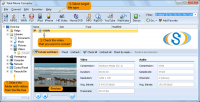
Total Movie Converter converts AVI, Flash, WMV, MPEG, VOB, IVF, DIVX, MPEG4, ASF, MOV, FLV to AVI, MPG, WMV, MPEG in batch mode. Options: resize, crop, flip, brightness and contrast, etc. So simple, even a beginner will master it in seconds.
A new video file converting solution that allows you to convert video files with ease! Use Total Movie Converter to convert AVI, Flash, MPG, WMV, MPEG, VOB, IVF, DIVX, MPE,M1V, M2V, mpeg4, ASF MOV, FLI, FLC to AVI, MPG, WMV, MPEG, FLV with just few clicks. To convert 2 or more (900+) files at once, use the batch mode. It saves your time and effort!
New Video-to-Device option allows converting video to iPod, iPad, iPhone, Zune, Xbox, or PS3 in minutes. Set the file and press convert to iPod. In a few minutes, your video is ready to be uploaded to an iPod. No need to mess with supported formats and best parameters. Everything is done automatically for you.
Total Movie Converter supports 3GP format. So you can make any video suitable for your cell phone. The powerful video decompress/compress engine of Total Movie Converter provides an extremely fast conversion. It supports both one pass and two pass encoding to achieve best video results.
If you want to run Movie Converter within other programs, use the command line. There are many options: resize, crop, flip, brigthness, contrast, etc. Total Movie Converter can also integrate into the Windows popup menu. This means that you can click the file from your desktop and select Convert to.
The program was developed to be handy. It doesn't ask additional irrelevant questions. You just select the files and press Convert to. So simple, that even a beginner will master it in no time.
Choose our affordable, but high quality Total Movie Converter to make the conversion of your video files fast and easy. Download it now, for free, and try it yourself. Whats new in version 4.1.19: New version can resize HD video from any HD camera. Requirements: A standart windows PC Operating system: Windows 2K / XP / Vista / 7 / 8 / 2003 / 10 Limitations: 30 day trial Release notes: Major Update
ImTOO 3GP Video Converter v3.1 is a professional mobile phone tool. It supports converting
various popular formats including RM, RA, 3GP, 3G2, WAV, MP3, AAC, WMA, MPG, M4A, AVI,
MP4, MOV, WMV, MPEG, CUE, APE, CDA and AVI to 3GP,RA, RM,AAC, M4A,XviD.
Price: $25.46, Rating: 8.2, Downloads: 107 Download
Total Audio Converter is the best tool to convert mp3, wav, flac, ogg, ape and much more. Look closer at it: TAC supports all audio formats, has built-in CD ripper and audio player, can be handled via command line and is still very user-friendly.
Price: $17.91, Rating: 6, Downloads: 100 Download
Reezaa WMA Converter is an easy-to-use all to WMA converter Converts all formats Video and Audio to WMA,WAV,MP3,OGG,FLAC,AMR,AC3,AAC.It supports MP3, AVI, WMV, MOV, 3GP, MP4, FLV, RM, RMVB, VOB, DAT, MPEG, WAV, WMA, ASF, OGG, RA etc.
Price: $29.95, Rating: 0, Downloads: 93 Download
Jesterware DVD Audio Ripper is a powerful DVD Audio ripping program, which will take your DVD and convert the audio track into an audio formats of your choice.
Price: $24.99, Rating: 6, Downloads: 69 Download
User Rating
Rating:2.2 out of
5 Based on13 ratings.
13 user reviews.

 Total Movie Converter 4.1.19 details